Product Tags
Tags are very handy tool to sort products, especially on the collection page. They are also the ones who influence on the range of items that is being displayed for the user. So you need to be careful and thoughtful defining tags for each of your products.
What you should know about tags as an owner of online shop that they bind recipes from the blog with the product in Foodly theme. This is the way how you can display particular recipe for a certine product.
Due to these specifics of tags in Foodly theme. Here's our recommendations how to name tags:
- the best tag is one discriptive word;
- the tag name should be in singular form;
- tags which bind products must be the same in all binding products (for example, vegetable, sale, fresh).
Examples of bad and good tags:
YES: tomato, vegetable, red, fresh, vitamin A, vitamin B, mineral Ca, harvest 2014, sale
NO: Campari Tomatoes, awesome product, CT, 2014, great product with the best prise
To add new tag, please do throug the following instruction:
- Open the product (Fig. 3.6 - [ 1 ] - [ 3 ] ) or add a new product (Fig. 3.6 - [ 1 ] - [ 2 ], [ 4 ])
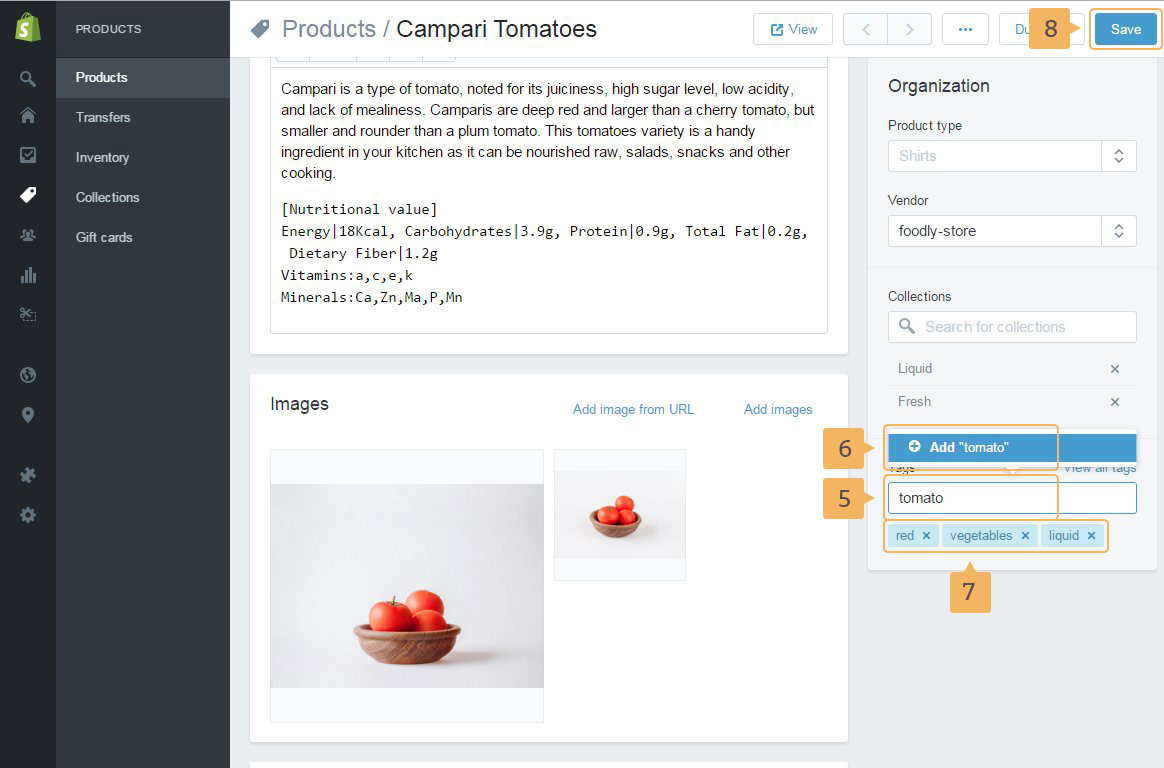
- In the right sidebar 'Organization', type tag name in 'Tags' input (Fig. 3.14 - [ 5 ]) and click 'Add your product type' (Fig. 3.14 - [ 6 ]) or type comma after the tag name. All tags for the current product are displayed below the 'Tag' field
- Save changes (Fig. 3.14 - [ 8 ])
You may find some extra info how to work with tag from Shopify help guide.